17|多 Agent 系统:层级委派与结果汇总
构建管理者与专业 Agent 的层级系统并汇总结果。
构建管理者与专业 Agent 的层级系统并汇总结果。
多 Agent 像编辑部:记者、事实核查和主编职责不同才有价值;三个人同时改同一段只会产生合并冲突。
本课交付物
设计研究员—质检员—编辑三角色协议,规定交付格式和争议升级。
核心讲解
多智能体系统使专业智能体能够在复杂任务上进行协作,提高模块化、可扩展性和稳健性。不依赖单一智能体,任务分配给具有不同能力的智能体。
在 smolagents 中,不同的智能体可以组合起来生成 Python 代码、调用外部工具、执行网络搜索等。通过编排这些智能体,我们可以创建强大的工作流。
一个典型的设置可能包括:
- 管理智能体(Manager Agent) 用于任务委派
- 代码解释器智能体(Code Interpreter Agent) 用于代码执行
- 网络搜索智能体(Web Search Agent) 用于信息检索
下图说明了一个简单的多智能体架构,其中管理智能体协调代码解释器工具和网络搜索智能体,后者利用像 DuckDuckGoSearchTool 和 VisitWebpageTool 这样的工具来收集相关信息。
多智能体系统实战
多智能体系统由多个专业智能体在 编排智能体(Orchestrator Agent) 的协调下共同工作组成。这种方法通过在具有不同角色的智能体之间分配任务来实现复杂的工作流。
例如,多智能体 RAG 系统可以整合:
- 网络智能体(Web Agent) 用于浏览互联网。
- 检索智能体(Retriever Agent) 用于从知识库获取信息。
- 图像生成智能体(Image Generation Agent) 用于生成视觉内容。
所有这些智能体在管理任务委派和交互的编排者下运行。
用多智能体层次结构解决复杂任务
提示:
你可以在{" “}
href=”
target=“_blank”这个笔记本{" "}
中跟随代码,可以使用 本地实验环境 运行。
接待会即将到来!在你的帮助下,小安现在几乎完成了准备工作。
但现在有个问题:蝙蝠车不见了。小安需要找到替代品,而且要快。
幸运的是,已经有一些关于布鲁斯·韦恩生活的传记电影,所以也许小安可以从某个电影拍摄现场留下的汽车中获取一辆,并将其重新改造到现代标准,这当然会包括完全自动驾驶选项。
但这可能在世界各地的任何拍摄地点——可能数量众多。
所以小安需要你的帮助。你能构建一个能够解决这个任务的智能体吗?
👉 Find all Batman filming locations in the world, calculate the time to transfer via boat to there, and represent them on a map, with a color varying by boat transfer time. Also represent some supercar factories with the same boat transfer time.
让我们来构建这个!
这个例子需要一些额外的包,所以首先安装它们:
pip install 'smolagents[litellm]' matplotlib geopandas shapely kaleido -q
我们首先制作一个工具来获取货运飞机转运时间。
from typing import Optional, Tuple

from smolagents import tool


@tool
def calculate_cargo_travel_time(
    origin_coords: Tuple[float, float],
    destination_coords: Tuple[float, float],
    cruising_speed_kmh: Optional[float] = 750.0,  # 货运飞机的平均速度
) -> float:
    """
    Calculate the travel time for a cargo plane between two points on Earth using great-circle distance.

    Args:
        origin_coords: Tuple of (latitude, longitude) for the starting point
        destination_coords: Tuple of (latitude, longitude) for the destination
        cruising_speed_kmh: Optional cruising speed in km/h (defaults to 750 km/h for typical cargo planes)

    Returns:
        float: The estimated travel time in hours

    Example:
        >>> # Chicago (41.8781° N, 87.6298° W) to Sydney (33.8688° S, 151.2093° E)
        >>> result = calculate_cargo_travel_time((41.8781, -87.6298), (-33.8688, 151.2093))
    """

    def to_radians(degrees: float) -> float:
        return degrees * (math.pi / 180)

    # 提取坐标
    lat1, lon1 = map(to_radians, origin_coords)
    lat2, lon2 = map(to_radians, destination_coords)

    # 地球半径(公里)
    EARTH_RADIUS_KM = 6371.0

    # 使用半正矢公式计算大圆距离
    dlon = lon2 - lon1
    dlat = lat2 - lat1

    a = (
        math.sin(dlat / 2) ** 2
        + math.cos(lat1) * math.cos(lat2) * math.sin(dlon / 2) ** 2
    )
    c = 2 * math.asin(math.sqrt(a))
    distance = EARTH_RADIUS_KM * c

    # 增加10%以考虑非直接路线和空中交通管制
    actual_distance = distance * 1.1

    # 计算飞行时间
    # 为起飞和着陆程序增加1小时
    flight_time = (actual_distance / cruising_speed_kmh) + 1.0

    # 格式化结果
    return round(flight_time, 2)


print(calculate_cargo_travel_time((41.8781, -87.6298), (-33.8688, 151.2093)))
设置智能体
对于模型提供商,我们使用 Together AI,这是 Hub 上的新推理提供商之一!
GoogleSearchTool 使用 Serper API 搜索网络,因此这需要设置环境变量 SERPAPI_API_KEY 并传递 provider="serpapi" 或者拥有 SERPER_API_KEY 并传递 provider=serper。
如果你没有设置任何 Serp API 提供商,你可以使用 DuckDuckGoSearchTool,但请注意它有速率限制。
我们可以先创建一个简单的智能体作为基线,为我们提供一个简单的报告。
task = """Find all Batman filming locations in the world, calculate the time to transfer via cargo plane to here (we're in Gotham, 40.7128° N, 74.0060° W), and return them to me as a pandas dataframe.
Also give me some supercar factories with the same cargo plane transfer time."""
agent = CodeAgent(
    model=model,
    tools=[GoogleSearchTool("serper"), VisitWebpageTool(), calculate_cargo_travel_time],
    additional_authorized_imports=["pandas"],
    max_steps=20,
)
result = agent.run(task)
result
在我们的例子中,它生成了这个输出:
|  | Location                                             | Travel Time to Gotham (hours) |
|--|------------------------------------------------------|------------------------------|
| 0  | Necropolis Cemetery, Glasgow, Scotland, UK         | 8.60                         |
| 1  | St. George's Hall, Liverpool, England, UK         | 8.81                         |
| 2  | Two Temple Place, London, England, UK             | 9.17                         |
| 3  | Wollaton Hall, Nottingham, England, UK           | 9.00                         |
| 4  | Knebworth House, Knebworth, Hertfordshire, UK    | 9.15                         |
| 5  | Acton Lane Power Station, Acton Lane, Acton, UK  | 9.16                         |
| 6  | Queensboro Bridge, New York City, USA            | 1.01                         |
| 7  | Wall Street, New York City, USA                  | 1.00                         |
| 8  | Mehrangarh Fort, Jodhpur, Rajasthan, India       | 18.34                        |
| 9  | Turda Gorge, Turda, Romania                      | 11.89                        |
| 10 | Chicago, USA                                     | 2.68                         |
| 11 | Hong Kong, China                                 | 19.99                        |
| 12 | Cardington Studios, Northamptonshire, UK        | 9.10                         |
| 13 | Warner Bros. Leavesden Studios, Hertfordshire, UK | 9.13                         |
| 14 | Westwood, Los Angeles, CA, USA                  | 6.79                         |
| 15 | Woking, UK (McLaren)                             | 9.13                         |
我们可以通过添加一些专门的规划步骤和更多的提示来进一步改进这一点。
规划步骤允许智能体提前思考并规划其下一步行动,这对于更复杂的任务非常有用。
agent.planning_interval = 4

detailed_report = agent.run(f"""
You're an expert analyst. You make comprehensive reports after visiting many websites.
Don't hesitate to search for many queries at once in a for loop.
For each data point that you find, visit the source url to confirm numbers.

{task}
""")

print(detailed_report)
detailed_report
在我们的例子中,它生成了这个输出:
|  | Location                                         | Travel Time (hours) |
|--|--------------------------------------------------|---------------------|
| 0  | Bridge of Sighs, Glasgow Necropolis, Glasgow, UK | 8.6                 |
| 1  | Wishart Street, Glasgow, Scotland, UK         | 8.6                 |
感谢这些快速更改,我们通过简单地为我们的智能体提供详细提示,并赋予它规划能力,获得了更加简洁的报告!
模型的上下文窗口正在快速填满。所以如果我们要求我们的智能体将详细搜索的结果与另一个结合起来,它将变得更慢,并且会迅速增加 token 数量和成本。
➡️ 我们需要改进系统的结构。
✌️ 在两个智能体之间分割任务
多智能体结构允许在不同子任务之间分离记忆,带来两大好处:
- 每个智能体更专注于其核心任务,因此性能更佳
- 分离记忆减少了每个步骤的输入 token 数量,从而减少延迟和成本。
让我们创建一个团队,包含一个专门的网络搜索智能体,由另一个智能体管理。
管理智能体应该具有绘图功能来编写其最终报告:因此让我们给它访问额外导入的权限,包括 matplotlib 和 geopandas + shapely 用于空间绘图。
管理智能体需要进行一些较重的思考工作。
所以我们给它更强大的模型 DeepSeek-R1,并添加 planning_interval 到组合中。
让我们检查这个团队是什么样子:
manager_agent.visualize()
这将生成类似于下面的内容,帮助我们理解智能体和使用的工具之间的结构和关系:
CodeAgent | deepseek-ai/DeepSeek-R1
├── ✅ Authorized imports: ['geopandas', 'plotly', 'shapely', 'json', 'pandas', 'numpy']
├── 🛠️ Tools:
│   ┏━━━━━━━━━━━━━━━━━━━━━━━━━━━━━┳━━━━━━━━━━━━━━━━━━━━━━━━━━━━━━━━━━━━━━━┳━━━━━━━━━━━━━━━━━━━━━━━━━━━━━━━━━━━━━━━┓
│   ┃ Name                        ┃ Description                           ┃ Arguments                             ┃
│   ┡━━━━━━━━━━━━━━━━━━━━━━━━━━━━━╇━━━━━━━━━━━━━━━━━━━━━━━━━━━━━━━━━━━━━━━╇━━━━━━━━━━━━━━━━━━━━━━━━━━━━━━━━━━━━━━━┩
│   │ calculate_cargo_travel_time │ Calculate the travel time for a cargo │ origin_coords (`array`): Tuple of     │
│   │                             │ plane between two points on Earth     │ (latitude, longitude) for the         │
│   │                             │ using great-circle distance.          │ starting point                        │
│   │                             │                                       │ destination_coords (`array`): Tuple   │
│   │                             │                                       │ of (latitude, longitude) for the      │
│   │                             │                                       │ destination                           │
│   │                             │                                       │ cruising_speed_kmh (`number`):        │
│   │                             │                                       │ Optional cruising speed in km/h       │
│   │                             │                                       │ (defaults to 750 km/h for typical     │
│   │                             │                                       │ cargo planes)                         │
│   │ final_answer                │ Provides a final answer to the given  │ answer (`any`): The final answer to   │
│   │                             │ problem.                              │ the problem                           │
│   └─────────────────────────────┴───────────────────────────────────────┴───────────────────────────────────────┘
└── 🤖 Managed agents:
    └── web_agent | CodeAgent | Qwen/Qwen2.5-Coder-32B-Instruct
        ├── ✅ Authorized imports: []
        ├── 📝 Description: Browses the web to find information
        └── 🛠️ Tools:
            ┏━━━━━━━━━━━━━━━━━━━━━━━━━━━━━┳━━━━━━━━━━━━━━━━━━━━━━━━━━━━━━━━━━━┳━━━━━━━━━━━━━━━━━━━━━━━━━━━━━━━━━━━┓
            ┃ Name                        ┃ Description                       ┃ Arguments                         ┃
            ┡━━━━━━━━━━━━━━━━━━━━━━━━━━━━━╇━━━━━━━━━━━━━━━━━━━━━━━━━━━━━━━━━━━╇━━━━━━━━━━━━━━━━━━━━━━━━━━━━━━━━━━━┩
            │ web_search                  │ Performs a google web search for  │ query (`string`): The search      │
            │                             │ your query then returns a string  │ query to perform.                 │
            │                             │ of the top search results.        │ filter_year (`integer`):          │
            │                             │                                   │ Optionally restrict results to a  │
            │                             │                                   │ certain year                      │
            │ visit_webpage               │ Visits a webpage at the given url │ url (`string`): The url of the    │
            │                             │ and reads its content as a        │ webpage to visit.                 │
            │                             │ markdown string. Use this to      │                                   │
            │                             │ browse webpages.                  │                                   │
            │ calculate_cargo_travel_time │ Calculate the travel time for a   │ origin_coords (`array`): Tuple of │
            │                             │ cargo plane between two points on │ (latitude, longitude) for the     │
            │                             │ Earth using great-circle          │ starting point                    │
            │                             │ distance.                         │ destination_coords (`array`):     │
            │                             │                                   │ Tuple of (latitude, longitude)    │
            │                             │                                   │ for the destination               │
            │                             │                                   │ cruising_speed_kmh (`number`):    │
            │                             │                                   │ Optional cruising speed in km/h   │
            │                             │                                   │ (defaults to 750 km/h for typical │
            │                             │                                   │ cargo planes)                     │
            │ final_answer                │ Provides a final answer to the    │ answer (`any`): The final answer  │
            │                             │ given problem.                    │ to the problem                    │
            └─────────────────────────────┴───────────────────────────────────┴───────────────────────────────────┘
manager_agent.run("""
Find all Batman filming locations in the world, calculate the time to transfer via cargo plane to here (we're in Gotham, 40.7128° N, 74.0060° W).
Also give me some supercar factories with the same cargo plane transfer time. You need at least 6 points in total.
Represent this as spatial map of the world, with the locations represented as scatter points with a color that depends on the travel time, and save it to saved_map.png!

Here's an example of how to plot and return a map:

df = px.data.carshare()
fig = px.scatter_map(df, lat="centroid_lat", lon="centroid_lon", text="name", color="peak_hour", size=100,
     color_continuous_scale=px.colors.sequential.Magma, size_max=15, zoom=1)
fig.show()
fig.write_image("saved_image.png")
final_answer(fig)

Never try to process strings using code: when you have a string to read, just print it and you'll see it.
""")
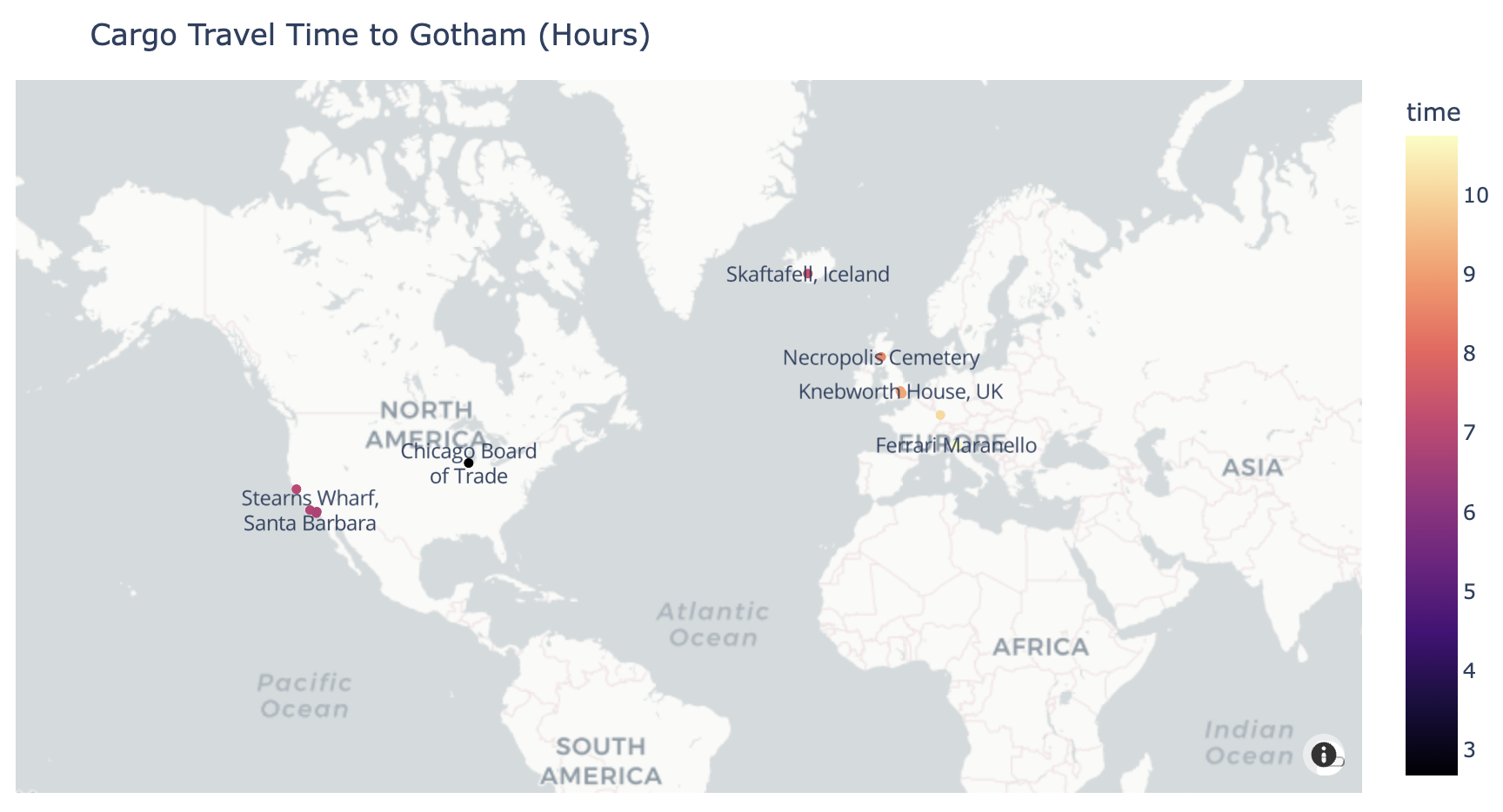
我不知道在你的运行中情况如何,但在我的运行中,管理智能体巧妙地将任务分配给网络智能体,首先是 1. Search for Batman filming locations,然后是 2. Find supercar factories,最后聚合列表并绘制地图。
让我们通过直接从智能体状态查看地图:
manager_agent.python_executor.state["fig"]
这将输出地图:
资源
- 多智能体系统 – 多智能体系统概述。
- 什么是智能体 RAG? – 智能体 RAG 介绍。
- 多智能体 RAG 系统 🤖🤝🤖 配方 – 构建多智能体 RAG 系统的分步指南。
本站实战工作台
团队只有在角色互补时才有价值
研究员找证据,事实核查员挑战来源,编辑整合面向读者的报告。若三个 Agent 都自由搜索、自由改稿,只会重复成本并制造冲突。多 Agent 系统首先是组织设计。
三角色协议
研究员输出 claim、source、quoteLimit、confidence;核查员只能标 supported、contradicted、insufficient,并附证据;编辑只能使用 supported,推断必须明确标注。共享状态由协调器写,各角色提交不可变产物。
ResearchArtifact → FactCheckArtifact → EditorialDraft
         ╲              ↑              ╱
          └──── conflict queue ────────┘
冲突如何处理
两份官方来源时间不同,不能多数票。协调器比较更新时间、定义范围和原始上下文;仍不确定则报告冲突。角色无权自行扩大任务或联系外部人员。
单 Agent 基线
先用一个 Agent 完成同一研究,再运行三角色版本。比较质量、成本、延迟、重复检索和冲突数。若多 Agent 只提高文风而成本翻三倍,应回到单 Agent 加一次确定性核查。
并发与状态
每个任务有 idempotency key;共享状态用版本控制;超时只重试安全步骤;一个角色失败时协调器可降级或停止,不重复已经产生外部影响的动作。
安全
委派不扩大权限。研究员只读公开来源,编辑没有浏览工具,任何发布仍需人批准。代理间消息也视为不可信输入并校验 schema。
通过标准是角色边界可执行、冲突有协议、单 Agent 对照存在,且多 Agent 的收益由指标而不是热闹程度证明。